
Install Casino Helper
Load it into Chrome, Edge or Brave, check that each step worked, and fix anything that does not.
18+ only. Gambling can become an addiction, and these claimers do not make it profitable. Read our note on gambling before you start.
Before you start
You need a computer with Chrome, Edge or Brave. Casino Helper does not run in Firefox or on phones.
Each claimer claims only with its own plan, for your username on its casino. Buy plans for the claimers you want to use. You can install Casino Helper first: a claimer without a plan says so in its panel.
| Claimer | Runs on | Plan from |
|---|---|---|
| ClaimerShuffle Code Claimer | Runs onshuffle.com | Plan fromA Script Claimer plan, in @ClaimerSubscriptionBot or your panel |
| ClaimerStake Code Claimer | Runs onstake.com | Plan fromA Script Claimer plan, in @StakeSubBot or its panel |
| ClaimerThrill Code Claimer | Runs onthrill.com | Plan from@ThrillCodeClaimerBot |
| ClaimerRainbet Code Claimer | Runs onrainbet.com | Plan from@RainbetCodeClaimerBot or its site |
Install, step by step
Five steps. Tick each one off as you go; your ticks stay in this browser.
The pictures are from English versions of each browser. In another language the buttons have other names, in the same place.
-
Download Casino Helper and unzip it
Press the button to download the zip. On Windows, right-click the file, choose Extract All, then Extract; on a Mac, double-click it. Move the unzipped folder somewhere it can stay, such as Documents: your browser runs Casino Helper from that folder.
It worked if you have a folder with a file called manifest.json directly inside it.
Stuck?
manifest.json is one folder deeper? Then that inner folder is the one to use in step 2.
-
Load it into your browser
Type this address into the address bar and press Enter; it cannot be opened from a link:
chrome://extensionsSwitch on Developer mode, top right of the page.
edge://extensionsSwitch on Developer mode, at the bottom of the menu on the left.
brave://extensionsSwitch on Developer mode, top right of the page.
Then press Load unpacked and choose the unzipped folder, the one with manifest.json directly inside.

Chrome. Load unpacked appears once Developer mode is on. 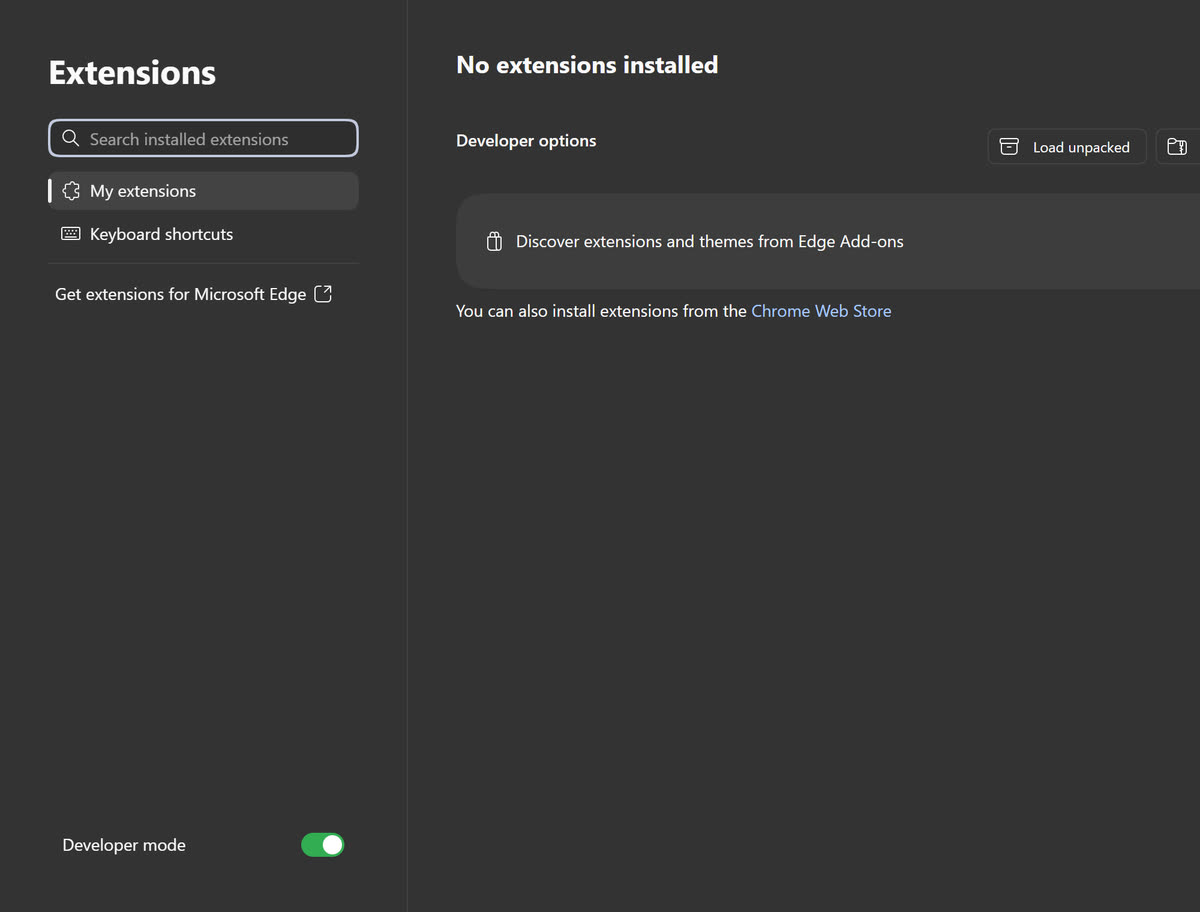
Edge. Load unpacked is under Developer options once Developer mode is on. 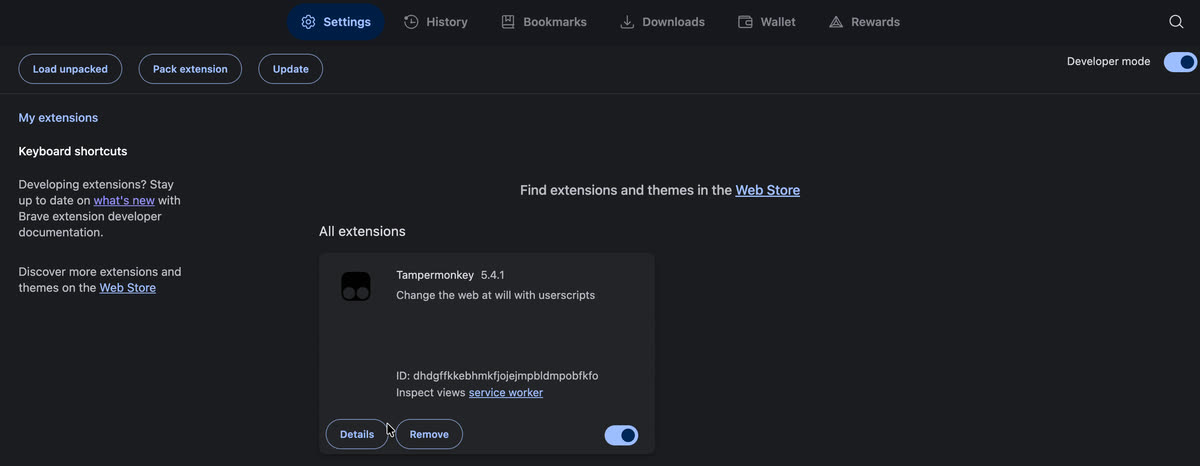
Brave. Load unpacked appears top left once Developer mode is on. It worked if Casino Helper is listed on the extensions page, switched on.
Stuck?
No Load unpacked button? Switch on Developer mode first. “Manifest file is missing or unreadable”: you chose the zip, or the folder around the right one. Choose the folder with manifest.json directly inside.
-
Allow updates
On the same extensions page, find Casino Helper's card and press Details. Switch on Allow User Scripts. This lets Casino Helper install new claimer versions by itself, without a new zip.
You can do it later: until then the claimers that came in the zip keep running, and Casino Helper's popup shows this step with an Open details button that takes you to the right page.
It worked if the switch next to Allow User Scripts is on.
Stuck?
No Allow User Scripts switch? Your browser is older than version 138, and Developer mode from step 2 does the same job. Keep it on.
-
Pin it to the toolbar
Press the puzzle-piece icon beside the address bar, then the pin next to Casino Helper. Its icon stays in the toolbar, and pressing it opens the popup where you switch each claimer on or off.
It worked if Casino Helper's icon is in the toolbar.
-
Open a casino and log in
Go to shuffle.com, stake.com, thrill.com or rainbet.com, log in, then refresh once. That claimer's panel appears and connects by itself. Leave the tab open: the claimer claims from it.
Then set the claimer up as its own guide says, for example the coin or currency codes are claimed in and its Telegram alerts: Shuffle · Stake · Thrill · Rainbet
It worked if the claimer's panel is on the page and its badge, top right, reads “Connected”.
Stuck?
No panel, or it says “No subscription”? The fixes are in Troubleshooting.


Turn a claimer on or off
Each claimer has its own card in Casino Helper's popup: a switch, a line saying whether it is running on the tab you are on, and links to its site, guide and Telegram channel. Switch off the ones you do not use, or one you want to pause.
- Press Casino Helper's icon in the toolbar. If you did not pin it, it is under the puzzle-piece icon.
- Switch the claimer off, or back on.
- Reload that casino's tabs if any are open: a tab keeps what it has until it reloads, and the card says so.
On a casino mirror a claimer does not know yet, open the popup on that tab: the claimer's card offers Turn on for the mirror's address. Your browser asks you to allow that one site, then the tab reloads with the panel. The same card can turn it off for that site again.
A claimer that is switched off does not run on its casino at all, so its panel and its Player tools are gone from that site too. Switching it off does not pause its plan: a plan runs for the time you bought.
Moving from Tampermonkey or Shuffle Helper
If a claimer is also installed in Tampermonkey, or you use Shuffle Helper, switch that copy off before you use Casino Helper on the same casino. Two copies of one claimer on one tab work against each other on the same account. If Casino Helper finds another copy running, it pauses its own on that tab, and the popup says where the other copy is.
- Tampermonkey: open its Dashboard and switch the claimer off, or delete it.
- Shuffle Helper: on the extensions page, switch Shuffle Helper off, or press Remove.
What carries over: your plans, which belong to your casino usernames, and anything a claimer keeps on its own server. What starts fresh: what the old copy kept in your browser, such as the panel's theme and position, and your hidden games.
To bring hidden games across, press Copy list in the old copy's Player tools, then Paste list in the same claimer's Player tools under Casino Helper.
Updating
Claimers update by themselves. Once Allow User Scripts is on, Casino Helper looks for new claimer versions when your browser starts and every 3 hours, and installs them. Its popup says what it found, with Check and Update now. A casino tab keeps the version it started with until you reload it: Casino Helper tells you, and never reloads a tab for you. New casinos can appear in the popup too, under More casinos, with an Add button that asks your browser for that one site.
Prefer to choose when? Open the popup's Updates page and switch off Install updates automatically. The toolbar icon then shows how many updates are waiting, and the popup's Update now installs them.
Casino Helper itself is not on the Chrome Web Store, so your browser cannot update it for you. When a new version is out the popup says so, with a Download button, and you load it the same way you loaded the first one.
- Download the new casino-helper.zip and unzip it. Keep the new folder somewhere it can stay.
- On the extensions page, check that Developer mode is on, press Load unpacked and choose the new folder, the one with manifest.json in it.
- It replaces the old copy in place: the same extension, with the same settings and claimer updates, and the claimer tabs reload by themselves.
- Delete the old folder once the extensions page shows the new version.
Do not install a claimer's userscript in Tampermonkey to get its update: it would be a second copy on the same tab.
Troubleshooting
Find what you see. For a claimer's own messages, such as a code that was not claimed, its own guide has the fixes: Shuffle · Stake · Thrill · Rainbet
| What you see | Why | What to do |
|---|---|---|
| What you seeNo panel on the casino | WhyCasino Helper is switched off, that claimer is switched off in the popup, or the folder was moved or deleted. | What to doOn the extensions page, check Casino Helper is listed and switched on, and in the popup that the claimer is on. If Casino Helper is missing or shows an error, do step 2 again. Then hard refresh: Ctrl+Shift+R, or Cmd+Shift+R on a Mac. |
| What you see“Manifest file is missing or unreadable” | WhyYou chose the zip, or the folder around the right one. | What to doUnzip first, then choose the folder with manifest.json directly inside. |
| What you seeNo Load unpacked button | WhyDeveloper mode is off. | What to doSwitch it on, on the extensions page: top right in Chrome and Brave, bottom left in Edge. |
| What you seeThe popup asks you to Allow updates | WhyAllow User Scripts is off for Casino Helper, so claimer updates wait. | What to doPress Open details in the popup and switch it on, as in step 3. The claimers keep running meanwhile. |
| What you see“No subscription” in a claimer's panel | WhyNo plan covers this username on that casino, or the plan has ended. | What to doThe plan's username has to match your username on the casino exactly. Check it, or renew, with that claimer's bot or site. |
| What you seeTwo panels, or one claimer acting twice | WhyThe same claimer also runs in Tampermonkey or Shuffle Helper. | What to doSwitch the other copy off, as in Moving from Tampermonkey or Shuffle Helper, then refresh. |
| What you seeCasino Helper stopped working after you moved or renamed its folder | WhyYour browser runs it from the folder you loaded. | What to doPut the folder back, or do step 2 again and choose the folder where it is now. |
Keep it claiming
- Leave the casino's tab open, and stop the computer sleeping while you want it to claim.
- Stop the browser putting background tabs to sleep, or the claimer sleeps with them.
A word about gambling
These are tools built around gambling platforms, so let's be straight about gambling itself.
Gambling can become an addiction. It is designed to hold your attention, and for some people that turns into something they can no longer control. Bonus codes, reloads and drops can make it feel like you are playing for free, but the activity underneath is still gambling.
The claimers save you from refreshing a Telegram channel at 3am. They do not make gambling profitable, and nothing here is financial advice. Only ever play with money you can afford to lose entirely. Player tools can hide games and remind you of the time; they are not a limit.
If gambling has stopped being fun, stop and talk to someone. BeGambleAware · GamCare · NCPG · Gambling Help Online
Still have questions?
Each claimer answers for itself, on Telegram. Shuffle, Stake and Thrill Code Claimer: @Goofy021. Rainbet Code Claimer: @Kylor07.